
1. Limit the shot to two inspectable contacts
Use one lavender bowl, one wooden tapping stick and a fixed close view. Plan roughly one second of stillness, two separated taps, then enough time for the last sound to decay. These are target beats; inspect the generated timing.
Open video creation. Choose a model and mode that support the reference and audio you need; check the current account eligibility and estimate. For this exercise, select a supported five-second setting. Enable generated audio only when that option is available. Merely writing “ASMR” does not add a soundtrack to a silent model.
Use an original object photo or generate a starting image. Keep the stick tip and the contact point visible; an extreme crop can hide the very event you need to judge.
2. Prepare a clear starting image
Create a single close-up starting frame for a quiet ceramic-tapping video.
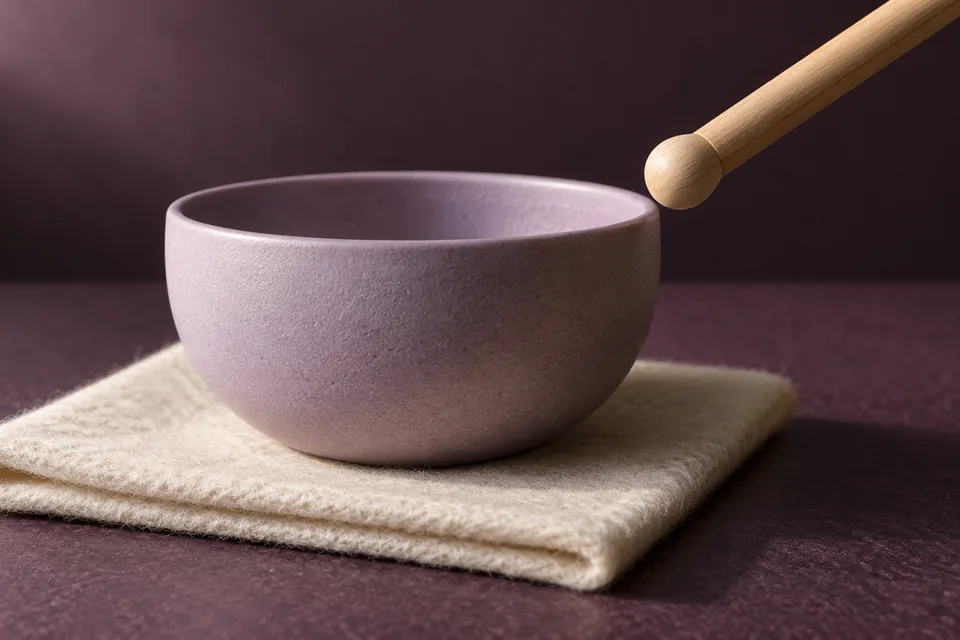
One matte lavender ceramic bowl sits on an ivory felt square on a dark plum tabletop. A rounded maple stick enters from the upper right and pauses just above the outside rim, with a visible gap.
Show the entire contact area and enough of the bowl to judge its shape. Soft light from the left, stable reflections, realistic ceramic texture, uncluttered background.
No hands, extra sticks, text, waveform graphic, logos or motion blur. The image should show the moment BEFORE the first tap. Use the selected video-friendly aspect ratio.
Make this in image creation, then explicitly select the approved image as the video input. A picture sitting nearby on a canvas is not automatically a reference. Our cover demonstrates the visual direction; it is not a tested input/output pair.
3. Give motion and sound separate instructions
Animate the supplied bowl image as one continuous five-second shot. Keep the camera, bowl, felt, lighting and background still.
The single wooden stick approaches the same visible point on the rim, touches lightly, moves away, pauses, then repeats once. Finish with the stick separated from the bowl. No cuts, extra objects, shape changes or camera movement.
Audio, if supported by the selected model: two quiet dry ceramic taps, each beginning at its visible contact. Leave a clear quiet gap between them and a short natural decay after the second. Low room tone; no speech, music or added impacts.
Keep the bowl intact. No chips, cracks or dramatic ringing. No captions.
Do not ask for a perfect loop here: the starting and ending stick positions may differ, and the sound tail may not join cleanly. First approve a short linear clip. If the selected route produces no audio, use a recording or licensed sound in an external video editor; the voice workbench is not a general Foley generator.
4. Review picture, sound and their alignment
| Pass | Check |
|---|---|
| Picture without sound | Exactly two contacts; no stick passing through the rim; no moving bowl silhouette |
| Sound without picture | Two distinct taps, no speech/music, no abrupt loud peaks or clipped tail |
| Picture and sound together | Each sound starts at the contact you actually see, with no extra invisible tap |
Start playback at a comfortable volume. If alignment is wrong, distinguish a consistent audio offset from an incorrect extra sound. A constant offset can be adjusted in an external editor; an invented third tap may need replacing or regenerating.
Revise this shot from the approved starting image. The second tap currently sounds before the stick reaches the bowl. Keep two contacts and the fixed camera. Align each sound onset with its own visible contact; remove any sound not caused by those contacts. Preserve a quiet ending.
If the motion also needs changing, simplify the stick movement rather than adding another cut.
Review the new output from the beginning. A correction request does not guarantee the first tap or bowl stayed unchanged.
5. Export honestly and keep a small iteration budget
Can the cover prove the audio quality? No. A still cannot prove synchronization, motion continuity or sound quality. This guide supplies a reproducible brief and acceptance checks, not a completed audio test.
Will every model produce stereo or binaural sound? No. Check the actual file and model capabilities; those words in a prompt are not a format guarantee.
How much does a retry cost? Generation and AI revisions follow Credits rules. Set a small iteration budget, check each quote and save accepted versions before trying another. Account access and available modes can differ.
Download the approved video, replay the saved file and label the scene as AI-generated when sharing. For several connected shots, continue with the three-shot microdrama workflow.
A starter message is filled in for you to edit and send. Chat is billed by usage; clear image requests generate directly and use Credits.